skip to main |
skip to sidebar
 Extensive test everywhere has shown one interesting tip we should pay attention to - turn off the VR mode on your 18-105mm kit lens when mounted on a tripod. This will result in significantly sharper images! The above image is obtained with VR activated when mounted on a tripod. The image below is one where VR is deactivated while shooting from a tripod.
 In fact, upon scrutinizing the user manual of the lens, it indeed says to NOT use VR on a tripod. So there you are ladies and gentlemen! The handwriting's on the wall. Turn VR off when shooting from a tripod for sharper images.
 Say a visit to the Nikon Service Center is too troublesome for you and you want a bit of DIY satisfaction with the maintenance of the Nikon D90. No lint-free cloth will do the job when it comes to cleaning the fragile sensor grid.It's an occasion to utilize the "arctic butterfly" toolkit. So with some spare cash to spare, this magnificent tool features a bright LED that illuminates the sensor while in operation. This illumination reduces the possibility of fibers being dragged accidentally against the surrounding cavity hence reducing the potential cause of smear usually caused by contaminated fibers.Get yours [here] for $90.
 Sometimes, you swear what you composed was razor focused, only to find that its not in Aperture 2 or Nikon ViewNX. Blame it on the small viewfinder or get a new pair of specs after an eye check. Or forget about using the default viewfinder piece - Nikon DK-23 rubber eye cup, while replacing it with the Nikon DK-21M.It promises a magnification of your viewfinder by over 17%, giving you greater confidence of knowing what you are aiming is what the camera is aiming.Note to adjust your diopter dial to make effective use of the upgrade. Retails for $24.95.
 Rummaging through the Nikon D90 retail box, I came across an accessory item Nikon DK-5 which I found rather cumbersome to use when shooting people portraits. Its a piece of plastic that attempts to shield the viewfinder from glare when on timer mode shoot.Much later, I found a neat trick to do what the Nikon DK-5 does, only totally not requiring the tedious chore of putting it on and taking it off! Just simply activate the Live View Mode when shooting with a tripod! A shutter curtain within the Nikon D90 will automatically be activated, cutting any remaining glare that sip through the glass view finder. This way, you still achieve the goal of not letting stray light confuse your exposure setting.There's bound to be something new each day!
 With an extended battery life much needed for anyone who wish to shoot images and videos in places power points are few between, you need another Nikon EN-EL3e battery in your MB-D80 battery grip.Latest figure from Nikon claims the battery will last an average of 850 shots per charge, although using it to record video consumes far more power. Conservatively, unless you are video recording 5-minutes clip every 6, the two Nikon batteries are estimated to churn out approximately 2.5 hours of recordings (overheating may occur), plus about 500 still shots.Now, if you are planning to do most still shots like me, medium-duration road trips lasting 7-10 days (with average daily shots of 150) can be performed without bringing the charging adapter supplied with the Nikon D90 along.
 Here's some new findings for all you 50mm F/1.8 owners. Despite the fact that we are told to lock the lens up to the minimal aperture of F/22 for only "P" or "S" mode, we should leave it locked even in "A" mode to avoid the "FEE" error appearing on the Nikon D90.Secondly, the use of DOF Preview button found on the Nikon D90 body will now become vital in helping us preview how well exposed the final shot will appear literally. As you will notice, shutter speed begin to drop with us moving the aperture closer to F/22.You tweak the aperture size using the Nikon D90's sub command dial (the one in front of the camera by default). Narrowing down the depth of field (with bigger aperture size) will give bokeh (a photographic term referring to the appearance of out-of-focus areas in an image produced by a camera lens using a shallow depth of field) effects on both the foreground and background of the subject.There! We have taken our first step into the realm of Aperture Priority shooting.
 Not surprisingly, the limitation of shooting exclusively with the "P" mode should now become pretty clear. At times, it just doesn't cut the mustard. At a review on the more popular shooting mode, it is true that Aperture Priority receives the greatest appeal.In fact, only 16% of the crowd prefer Program Auto mode! To fully understand the appeal of the "A" mode or "S" mode, it is recommended you shoot exclusively on that mode for say a month. No amount of written guide can give you that feel you require.
 I did mentioned in the past, some of the key advantages of using live view for image shoots. Nevertheless, as our focus now delve on video shooting, let me touch on some of the basic highlights on using it properly.Focus is manual in live view video mode, in hope by Nikon that special video effects be possibly achieved at the cost of lazy users like us! But I am pleasantly surprised that sound recording (only mono channel recording) can be muted entirely (Shooting Menu -> Movie Settings). This gives us the ease of adding our music into the video composition thereafter. 720p HD video recording is limited to 5 minutes whereas a lower recording resolution will yields longer clips duration.Interestingly, the White Balance can also be dynamically adjusted on the fly while recording your video on the Nikon D90! I am also quite impressed that the camera automatically adjust to the lowest ISO for your video shoot, depending on how fast a type of lens you have attached to your camera. Neat! Hence, the rule of thumb is, video quality significantly improves with a faster lens (ie bigger aperture). Note that for lens with aperture ring, it should be unlocked to allow manual adjustment for a proper video set.Trick to try is this, if you are lazy about playing with your aperture during your video shoot, set it to the highest value for your lens and leave it as that, promising the deepest depth of field for sharper videos.
 No matter how well you store your Nikon D90 or practice the invert-change-lens rule, or for that matter, don't change lens at all, you are bound to have dust settled in the mirror section and sensor section of the camera.I was doing a routine inspection by simply looking through the lens towards a light source and voila! Dust speckles are deposited everywhere on the mirror section! There's even smudges on the lower section of the mirror. Now, I have not activated the "Lock mirror up for cleaning" function in the Setup Menu, but I decide to give the sensor the benefit of a doubt that it is still clean. Besides, sensor cleaning should be done by the local Nikon technicians if you clearly lack a steady hands and right tools.
With a lint-free dry cloth (usually come standard with purchase of a good LCD monitor or laptop), I gently removed the lens and began cleaning the smudges and dust particles off the mirror section. Shortly after, the job is done. Talking about sensor cleaning, its a good practice to enable it when you off/on the camera. This way, you leave no occasion to chance that dust deposits starts accumulating on the sensor grid.
Note, for zoom lens, air is drawn into the lens when you zoom in and out, giving occasion for dust to get into your body with the lens tightly attached!
Another week, another chapter to fine tune my experience with the Nikkor 50mm lens. I have been absent for a few days due to work commitment but I am back to share my new findings with the 50mm lens I own.To really appreciate and achieve sharp images out of this lens, I strongly concluded that manual focus is the only way to go! No means of narrowing down single-point focus etc. will yield consistently sharp focus. Only the gauge from your eyes can determine that via manual control of the aperture ring. But again, if this is not possible, attempt to shoot at F/2.8 to F/5.6 for sharp auto-focused images.Otherwise, its goin' to turn soft and fluffy 95% of the time, giving you that reason to avoid its use subsequently.
 Hey, that's what I said! Unlike folks who upload their photos onto Flickr, Picasa etc. and leave it as that with a bunch of comments, I thought I can make this a bit more interesting in 2009. Nikon should have one sometime in September 2009 but that should not stop you from joining any local contests before that!
Go on, get yourself together and inject a few doses of life enrichment in the current economic slump. Most folks I talked to has given up on doing their company sales forecasting. Its pointless they say. Its just survival of the fittest for the next few years. So, why not join in that next photo contest in your city? Your boss has or will probably request you to take FTO soon. A Leave Of Absence (LOA) is however, not necessary.
 As I clocked more scenario and time in my shoot out, I am beginning to see why the A and the S mode is, to most professional, a better way to operate their camera on. Frankly, I was getting quite comfortable in my "P" education level. In fact, 98% of the shots in my gallery was taken in the lazy man "P" mode.I kinda dreamt about this moment in writing the need to graduate from the automatic mode of photography some days back. Using the F/1.8 aperture of the Nikkor 50mm has indeed taught me that not always, bigger is better. The very shallow DOF just messed up quite a few of my shots recently. Also, in my eagerness, I may have also broken the law of the closest focal length of the lens.The Auto White Balance also turn screwy as color rendering began to look confused when in focus of strong-colored subjects and ambient! So, I guess that's why there is indeed more to learn and write about in photography after all! Check the above image as an example of color overrun in one of my shoot.
Being the time of the year where family portraits is the preferred shooting mode, I have been shooting for the last two days with my tripod. However, when mounted on the tripod (in P mode), the Nikon D90 does occasionally take the liberty of releasing my shutter at a slightly lower (set at minimal 1/50 in my menu) speed of 1/40 second! Hmm...how interesting!O yes, this will happen when the "Lo" indicator is displayed in your viewfinder. Rationale? In Program mode, if you do not pop the built-in flash up, the camera will first attempt to raise the ISO. Secondly, it will also attempt to shoot at the largest aperture possible from the lens. Third, if what's done is still insufficient, it will attempt to lower the shutter speed to the predefined lowest. It should not go any lower as I experienced above. I think it can be said that this could possibly be the first discovered "bug" in the firmware?Nikon D90 still allows a shutter release despite the "Lo" setting but should not "override" the predetermined lowest shutter speed in the Shooting Menu.
 Attempting to perfect the use of the 50mm lens, I now carry with me the following setup to shoot everywhere I go...including tonight's Chinese New Year Eve reunion dinner.The large F/1.8 aperture literally makes flashes almost redundant during low ambient lighting. My MB-D80 battery grip simply allows me to shoot longer without concern about low battery, in both video and image mode all day.
 Perhaps, at about 1000 posts, I shall move up to the Nikon D700 full frame realm of photography? For now, let's just enjoy the ride!
 The fundamental ground for good High Dynamic Range (HDR) images consists of a combination of appropriate software - Aperture/Photomatix Pro, stable tripod (or forego tripod use by shooting brackets at 4.5 FPS - see my previous posts), "ideal" composition, "good" weather condition and auto-bracketed Nikon D90.With my recent installation of Photomaxtix Pro on my Macbook Pro, its finally time to begin. Get the full copy of Photomatix Pro for only $99! If you are like me, a novice in HDR, head towards [here] for a debrief before embarking on your first HDR shootout!
The above image will soon look quite familiar to you...
 Ready to rock 'n roll to shoot video with the world's first DSLR camera?Here's the introduction you must view to begin.Enjoy!
 Most of us will invest in a lens filter to protect our optical investment. But do note that undesirable lens flaring (see image above) can occur when having it on during night shoots.My experience has got me to have no choice but to remove it entirely during the shooting duration. This very much applies to situation where strong fluorescence light sources are in the vicinity of the shoot.
Otherwise, it should be fine.
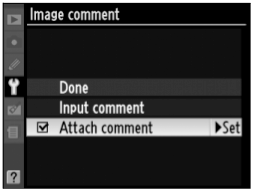 Ever wonder if this can be done and how it be applied to each image you take?Simply fire up your menu, and move to the Setup Menu tab. Select "Image Comment" and "Input comment". Upon entering your copyright information, hit "OK" before checking the "Attach comment" menu item.Done!Sadly, unlike the Nikon D3, no voice note can be attached to the photo you take on your Nikon D90. On first glance, these EXIF information can only be visible when third-party programs like Aperture 2.1, Photoshop CS3 or Nikon View NX are used.
 In a word, its just not worth it! Most buyers who bought into generic battery pack got their rude wake-up call when it refuses to charge while some only worked on a specific model of a camera. Yes, it may look and give buyer a kick into thinking they saved, but only a fraction of my friends who did so was rewarded.Moreover, its a $1400 machine...why risk saving $20 on a generic battery? Nevertheless, the better known OEM battery manufacturer include Camera Devices and Adorama.


